
















EU Legal Guarantee and GARAN Label — Documentation
Since 27 September 2026, shops that sell goods to consumers in the European Union show two harmonised visuals defined by Commission Implementing Regulation (EU) 2025/1960: the notice on the legal guarantee of conformity and the EU GARAN label. This module displays both in your PrestaShop store, in the order confirmation email and in the customer’s language, without changes to your theme.
What the EU rules require and what the module does for you
Two visuals, two different guarantees
The two visuals look alike, but they are about two different guarantees and follow different rules.
The harmonised notice
- Reminds consumers of the legal guarantee of conformity: at least two years, owed by the seller, for every product.
- Every seller shows it, at shop level. There is nothing to declare per product.
- Online: a short sentence such as “Your legal guarantee rights” that opens the full notice.
The EU GARAN label
- Shows a commercial guarantee of durability that the producer offers for a particular product.
- Only when that guarantee is free, covers the entire product and lasts more than two years.
- Shown next to the product, at checkout and in the confirmation email.
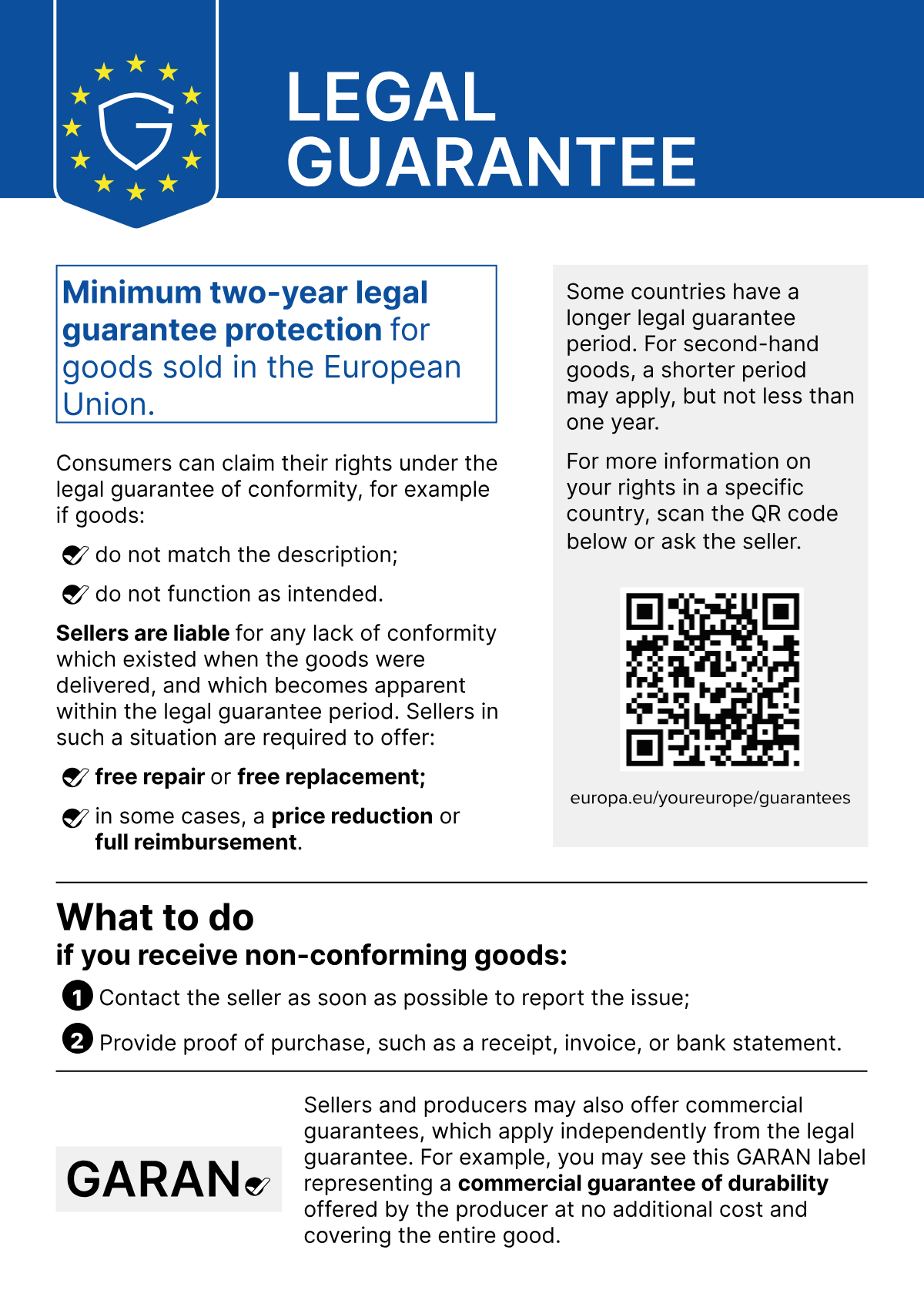


The legal guarantee always applies, whether or not a product has a GARAN label. A producer guarantee never replaces or shortens it.
What the official guidelines expect online
The European Commission’s Practical guidelines for sellers and producers (DG JUST, April 2026) describe how to show the two visuals in a web shop.
| Topic | Harmonised notice | EU GARAN label |
|---|---|---|
| Where | A sentence such as “Your legal guarantee rights” in the header, on catalogue pages and at checkout | Next to the product before purchase, and directly before the order is placed |
| How it opens | The full notice appears on the first click or mouse-over | A compact “nested label” may be used where space is limited; it must open the full label on click or mouse-over |
| Link | A clickable link to the same Your Europe page as the QR code must always be available | |
| Appearance | Colour version, legible at default size, never altered (only the three label fields are editable) | |
| Order confirmation email | Included | Included for the products that carry it |
What the module does for you
After installation the notice is already shown in the places the guidelines name. The label appears as soon as you tell the module which products have a qualifying producer guarantee.
| Guidelines expectation | What the module does (default) |
|---|---|
| Notice sentence in the header and on catalogue pages | “Your legal guarantee rights” link in the header, the footer and below category lists (on) |
| Notice sentence at checkout | “Please check your legal guarantee rights before buying” above the payment options (on) |
| Full notice on first click or mouse-over | Accessible pop-up with the official notice in the customer’s language and the Your Europe link; a plain page for browsers without JavaScript |
| Notice in the confirmation email | Inline image and link (on), or the official PDF as an attachment, or both |
| Label visible before purchase, with the product | Full label on the product page and nested label on product cards and in the cart (on) |
| Label directly before the order is placed | “Guarantees for the products in your order” on the payment step (on) |
| Label in the confirmation email | The label of every ordered product that carries one (on) |
| Artwork never altered | Official files; only duration, brand and model are filled in, in the required Inter font |
The module also checks your set-up for you: the Compliance checklist in the settings shows at a glance whether the notice, the labels and the emails are where they should be (Overview › Compliance checklist).
What remains your responsibility
- Deciding which products may carry the GARAN label. Use it only for a guarantee offered by the producer, free of charge, covering the entire good, for more than two years. Never for your own shop guarantee, a paid extended warranty or a guarantee on a part only.
- Entering the duration, brand and model exactly as the producer states them. The producer informs you about the guarantee; you do not have to search for it yourself.
- Keeping the notice visible at shop level, at checkout and in the confirmation email.
- Everything outside the web shop: printed notices and labels in a physical shop, the producer’s guarantee statement, country-specific rules.
How to read this guide
- Words in bold blue are labels exactly as the back office shows them, for example the Save button. A path such as Modules › Module Manager means: open Modules, then Module Manager.
- Numbered markers in a screenshot are explained in the list under it.
- The screenshots show PrestaShop 9.1 with the Hummingbird theme. On PrestaShop 1.7.8 and 8, and with other themes, the pages look slightly different, but the module’s screens and labels are the same.
- If you only want the essentials, read Quick start: compliant in 5 minutes first.
- This guide exists in English, French, Spanish, German, Italian, Polish and Romanian, the languages of the module’s back office.
Requirements and compatibility
The module runs on every current PrestaShop version and needs nothing special on the server. This chapter lists what it supports and the one server feature that is recommended.
Compatibility at a glance
| Item | Supported |
|---|---|
| PrestaShop | 1.7.8.x, every 8.x and every 9.x version |
| PHP | 7.1 to 8.5, whatever your PrestaShop version supports |
| Themes | Classic and Hummingbird work out of the box. Other themes usually work too; if a placement does not appear, see Theme integration for custom themes. |
| Product page | Both the PrestaShop 1.7.8 product page and the new product page of PrestaShop 8 and 9 get the module’s GARAN card. |
| Multistore | Yes: settings, product guarantees and brand rules are kept per shop (Multistore). |
| Storefront languages | The notice and every text your customers see exist in the 24 official EU languages. |
| Back-office languages | English, French, Spanish, German, Italian, Polish and Romanian. Other back-office languages show the English texts. |
| Emails | The order confirmation of PrestaShop (order_conf), stock or customised, including email themes. |
Server requirements
| Item | Requirement |
|---|---|
| Image library | GD with FreeType is recommended. Almost every host has it. See the next section for what it is used for. |
| Upload limit | The module zip is about 6.5 MB because it contains the official notice in 24 languages, as an image and as a PDF. If your host accepts only smaller uploads, install by FTP (Install by FTP when the upload is too large). |
| Image folder | The module stores the rendered labels in img/eugaranlabel/ of your shop. The web server must be able to write there, as it writes product images. |
| Web server | Apache: compression and browser caching of the labels are set up automatically. nginx: optional settings in Compression and caching of the label images. |
| Internet access | None needed: the module makes no calls to outside services. Your shop must be reachable from the internet so that email programs can load the images of the confirmation email. |
What GD with FreeType is used for
GD is PHP’s image library; FreeType lets it draw text. The module uses them to draw the brand, model and duration onto the label images sent by email.
| Feature | With GD + FreeType | Without |
|---|---|---|
| Notice on the storefront, in the pop-up and in emails | Yes | Yes |
| GARAN labels on the storefront (vector images) | Yes | Yes |
| GARAN label images in the order confirmation email | Yes | Text and link only |
| PNG column of the label preview in the back office | Yes | Message instead |
The Compliance checklist tells you whether your server has it (line PNG rendering available (GD with FreeType)).
Tested set-ups
- PrestaShop 1.7.8.11 with the Classic theme, PHP 7.4, with two shops (multistore)
- PrestaShop 8.2.2 and 8.2.3 with the Classic theme, PHP 8.1, including a multistore shop with a 5,000-product catalogue in four languages
- PrestaShop 9.0.1, PHP 8.4, with two shops: one on the Classic theme, one on Hummingbird
- PrestaShop 9.1.4 with the Hummingbird theme, PHP 8.5